Accelerate and FSDP
Hugging Face Accelerate adapts a PyTorch training loop to different device layouts and launches the required processes. Run:ai still schedules the pod or pods, mounts data, and allocates the approved GPUs; Accelerate does not request cluster resources by itself.
Adapt the training code
Section titled “Adapt the training code”At minimum, create one Accelerator, prepare the model, optimizer, dataloader,
and scheduler, and use accelerator.backward(loss). The official Accelerate
quick tour shows the complete
code changes.
Keep rank-sensitive work behind the Accelerate helpers:
from accelerate import Accelerator
accelerator = Accelerator()
model, optimizer, train_loader = accelerator.prepare(    model, optimizer, train_loader)
for batch in train_loader:    optimizer.zero_grad()    loss = model(**batch).loss    accelerator.backward(loss)    optimizer.step()
accelerator.wait_for_everyone()if accelerator.is_main_process:    save_final_metadata()
The checkpoint must include enough state to resume the experiment, including the model, optimizer, scheduler, current step or epoch, and random state where the application depends on it.
Pin the Accelerate configuration
Section titled “Pin the Accelerate configuration”Generate a configuration with accelerate config, review it, and store the
result with the code. A single-node, four-GPU configuration has this general
shape:
compute_environment: LOCAL_MACHINEdistributed_type: MULTI_GPUmachine_rank: 0main_process_ip: nullmain_process_port: nullmixed_precision: bf16num_machines: 1num_processes: 4use_cpu: falseThe num_processes value must match the GPUs allocated to the pod. Do not copy
bf16, the process count, or any FSDP option without validating that it matches
the model, image, and approved compute resource.
Configure the Run:ai workload
Section titled “Configure the Run:ai workload”-
Build an immutable image containing the training code, Accelerate version, configuration file, and dependencies.
-
Create or select a Run:ai environment for that image.
-
Under Runtime settings, set the tested command explicitly:
Terminal window accelerate launch \--config_file /workspace/config/accelerate.yaml \/workspace/train.py \--epochs 1 -
Select the approved compute-resource preset whose GPU count matches
num_processes. -
Mount persistent data and checkpoint paths.
-
Run a short test and verify that only the main process writes shared output.
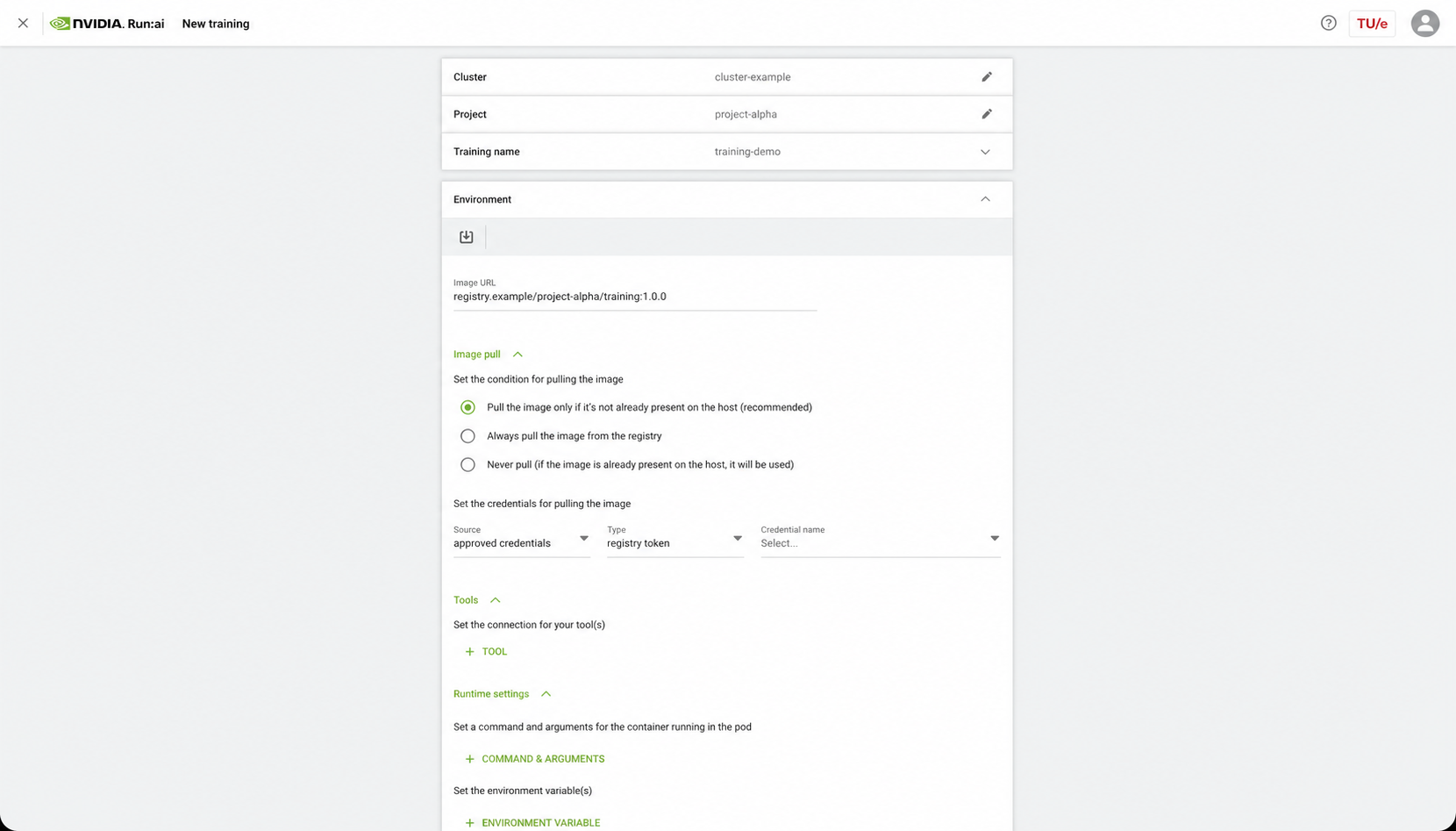
The current Accelerate launcher
guide
documents --config_file, multi-GPU, mixed precision, and multi-node launch
parameters.
Progress to FSDP
Section titled “Progress to FSDP”FSDP is useful when a model or optimizer state does not fit comfortably on one GPU. It adds sharding, wrapping, mixed-precision, and checkpoint decisions that must be tested together.
- Keep the same single-GPU baseline and expected result.
- Add an FSDP configuration generated for the installed Accelerate version.
- Validate a short single-node multi-GPU run.
- Save and reload a sharded checkpoint.
- Compare convergence and effective global batch size with the baseline.
- Attempt multi-node only after review with your SCC AI Engineer.
Use the official Accelerate FSDP guide and PyTorch Distributed Checkpoint guide for current configuration and checkpoint APIs.
For multi-node work, follow Multi-GPU and multi-node training. The launcher must run on every participating pod with coordinated ranks and rendezvous settings; a single-node Accelerate configuration is not sufficient.